


Buddy.ai: Kids Learning Games
AI Buddy Inc.
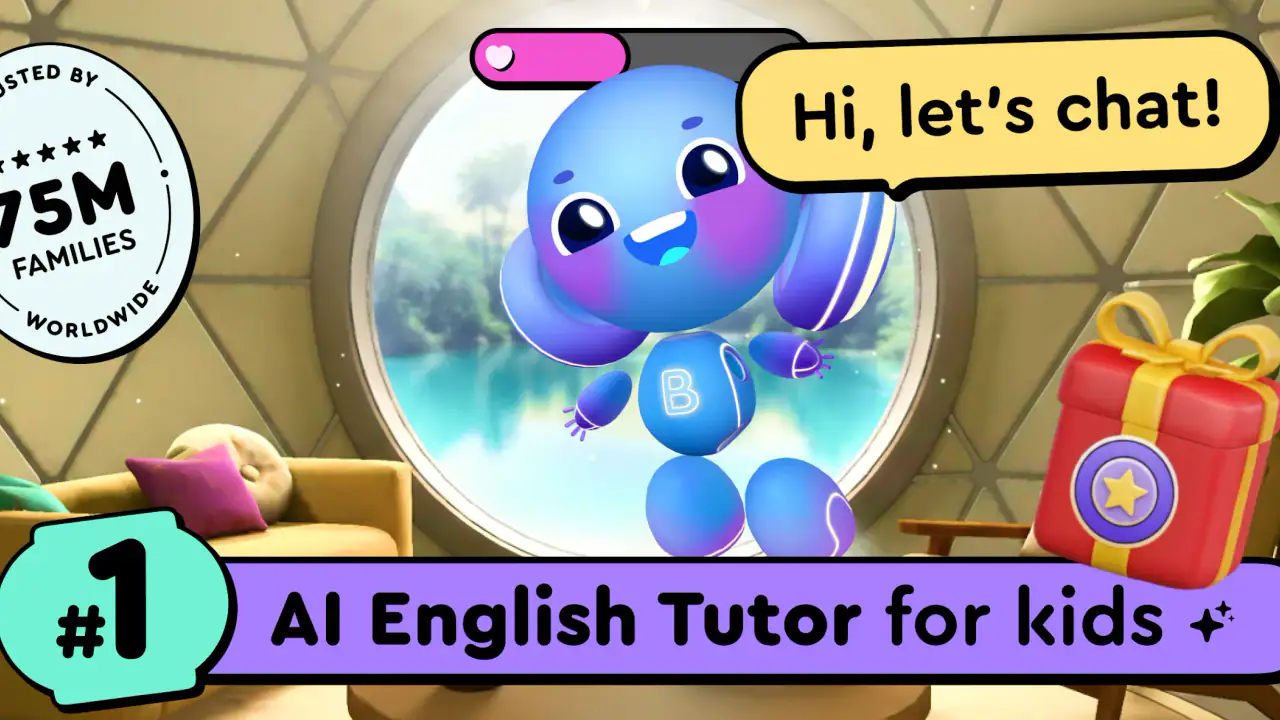
When I first opened Buddy.ai: Kids Learning Games, I understood the appeal almost immediately. It is an education app built around an AI tutor for young children, with activities connected to speech, STEM, ABC learning, and art. The intended range is preschool through first grade, so this is not trying to be a general homework tool or a replacement for a full classroom. It is designed for short, friendly learning moments in which a child can interact with a digital character rather than simply tap through worksheets.
That difference matters. Many early-learning apps are really animated flash-card collections with a few games attached. Buddy.ai feels more conversational in its concept, which can make practice less intimidating for a child who does not yet enjoy formal lessons. I found the strongest case for it in everyday routines: a few minutes before dinner, a quiet activity while a parent handles another task, or a gentle way to revisit letters and basic concepts after school. My overall impression is positive, but the app earns a lasting place only when an adult treats it as part of a routine rather than expecting the novelty of an AI tutor to carry the experience by itself.
Why the first week feels so inviting
The opening appeal comes from the combination of voice interaction and child-friendly subjects. A young learner can approach speech practice differently from a traditional exercise in which an adult asks for repetition face to face. The digital tutor creates a little distance, and that can help a shy child try again without feeling watched. For children who enjoy talking to characters, this is a more natural invitation than staring at a page of letters.
The range of topics also makes the first sessions easier to vary. ABC activities can support early recognition, while STEM and art provide a change of pace. Speech work adds another kind of participation, because the child is not only looking at the screen. I would not treat these areas as equally useful for every child, though. A child who already knows the alphabet may get more from speaking or creative activities, while a younger preschooler may need repeated exposure to basic symbols before the broader subjects become meaningful.
The app is free to install, which lowers the barrier for families who want to see whether their child responds well to this style of learning. It includes in-app purchases ranging from $3.99 to $119.99 per item, so I would make the purchase decision deliberately rather than handing the phone over and allowing a child to explore payment screens. The free starting point is helpful, but families should still decide what role the app will have before spending money on expanded access.
Latest News

Uber Eats Under Pressure: What Happens When Delivery Goes Wrong

How QR & Barcode Scanner Adapts to Android and iOS Innovations

Why Waze Navigation & Live Traffic Is Your Essential Travel Companion

CapCut Mastery: Unleash Hidden Features for Pro-Level Editing

How OS Updates Enhance Roblox Adventures

Teacher Simulator: Exam Time Turns Quick Classroom Judgments into a Repetitive Loop
Its audience is unusually clear. The age rating is Everyone, but the learning design is aimed at children from age 3 through age 8. That does not mean every child in that span will find the same activities appropriate. A three-year-old may need an adult nearby to explain what to do and keep the session short. An eight-year-old may find the simplest material too easy unless they are using the app specifically for reinforcement. I see the best fit in children who are beginning structured learning and enjoy playful repetition.
A realistic first-week routine would be to use it after breakfast for five to ten minutes, with the child choosing one activity and the parent asking afterward what they practiced. That small conversation is more valuable than leaving the app running in the background. It turns a screen session into a prompt for recall: the child explains a new word, demonstrates a sound, or describes an art activity. I would also avoid introducing every subject at once. Starting with the area where the child needs confidence makes it easier to tell whether the tutor is genuinely helping.
The developer, AI Buddy Inc., has clearly positioned the app around accessibility for young learners rather than around complicated controls. That is important for the first experience. A child should be able to understand the basic rhythm of an activity without a parent giving a long demonstration. Even so, parents should expect to help with setup, navigation, and deciding when to stop. The app may be child-oriented, but it is not a substitute for supervision, especially when the device is shared with other family members.
Gallery
What I would watch during the trial period
During the first few sessions, I would pay attention to three things instead of judging the app only by whether the child smiles. First, does the child attempt answers aloud, or merely tap through prompts? Second, can the child explain something learned after the screen is closed? Third, does the child choose an activity again on another day without being pushed? These signs reveal whether Buddy.ai is creating learning habits or simply delivering a pleasant distraction.
One useful tactic is to keep the device in a common area and make the session predictable. If the app becomes an isolated reward, the child may focus on getting screen time rather than engaging with the lesson. If it becomes a short part of a routine, the parent can notice which subjects are helping and which ones are being skipped. That observation is especially important because a broad educational app can look successful while quietly avoiding the skill a child most needs to practice.
What remains useful after the novelty fades
The month-to-month question is more demanding than the first-week question. An AI tutor is interesting at the beginning, but lasting value depends on whether the activities remain useful after the child understands the basic interaction. In my view, Buddy.ai has a reasonable chance of staying relevant when it is used for reinforcement: repeating early speech practice, revisiting ABC foundations, or giving a child a different way to approach simple STEM ideas.
Its strongest long-term role is not intensive instruction. I would use it as a flexible supplement between adult-led activities, books, classroom work, and hands-on play. For example, a child might practice a sound in the app, then look for objects at home that begin with that sound. A STEM activity can be followed by a simple real-world experiment using household objects, while an art session can lead to drawing away from the screen. The app becomes more valuable when it sends the child back into the physical world.
This is also where it compares favorably with ordinary worksheet apps. Worksheets can be useful for quiet repetition, but they often depend on a child already understanding the instruction and holding a pencil comfortably. Buddy.ai offers a more approachable route for children who learn better by listening and speaking. On the other hand, a physical book or a parent’s conversation can respond more naturally to confusion, imagination, and unexpected questions. I would choose Buddy.ai for guided repetition, not for the richer back-and-forth that a person can provide.
Compared with video-based learning, the app has a more active feel because the child is expected to participate rather than simply watch. That can be a meaningful advantage for short sessions. Video, however, may be better when a child needs a visual demonstration or a story with a slower narrative pace. The right choice depends on the goal. If I want my child to practice responding, I would prefer Buddy.ai; if I want to introduce a topic through a longer explanation, I would look elsewhere as well.
The app’s public reception suggests that many families find the format appealing: it has a 4.7 average from around 626 thousand ratings and has passed 50 million installs. Those figures show substantial reach, but they do not decide whether it will work for one particular child. Early learners differ dramatically in speech, attention, confidence, and reading readiness. I would use the popularity as a reason to investigate, not as proof that every activity will suit every family.
Version 6.24.0 is the current version, and the app runs on Android 8.0 or later. For a family using an older device, checking compatibility before planning a regular routine is sensible. A learning habit is easily broken by a device that is unavailable, shared among siblings, or too slow for comfortable use. I would also decide in advance whether the child uses a phone or tablet, because a larger screen may be easier for certain visual activities while a phone is more convenient for quick practice.
How to turn occasional use into progress
I found that the most practical approach is to give each session one purpose. On one day, focus on speech and ask the child to use the target sound in a normal conversation afterward. On another, choose ABC practice and look for the same letters in a book or on food packaging. For STEM, ask the child to predict what might happen before doing a hands-on activity. This prevents the app from becoming a random carousel of colorful tasks.
Another worthwhile habit is to let the child choose between two suitable activities rather than offering unlimited choice. Choice supports independence, but too many options can turn learning into browsing. A parent can say, “Would you rather practice letters or try a science activity?” and then allow the child to commit to one. This is a small adjustment, but it reduces the temptation to skip whenever a prompt becomes challenging.
I would not measure success by minutes spent inside the app. A short session followed by a child using a new word or recognizing a letter in daily life is more meaningful than a long session filled with passive tapping. Parents can keep a simple mental note of which skills appear outside the app. If nothing transfers after several weeks, the problem may not be the child; the app may simply be better suited to exposure than mastery.
The maintenance burden parents should expect
Buddy.ai is easier to maintain than a full home-schooling program, but it still needs adult management. Someone has to choose an appropriate time, keep the device charged, supervise the first interactions, and decide whether paid content is worthwhile. The app reduces the need to invent every activity from scratch, yet it does not remove the parent’s role in connecting digital practice with real learning.
Purchase management deserves particular attention. Because the app is free with in-app purchases, I would review the available options personally before allowing independent use. The listed purchase range extends from a few dollars to $119.99 per item, which is a substantial difference. A child should not be the person deciding whether a paid option is necessary, and parents should make sure the device’s purchase controls match the family’s expectations.
There is also a content-maintenance issue. A child’s needs change quickly between preschool and first grade. An activity that feels just right at one stage may become repetitive later, while another may be too advanced at the beginning. Parents should periodically check whether the child is still being challenged in a useful way. If the child can complete everything without thinking, the app may have shifted from learning tool to background entertainment.
I would schedule a brief review every few weeks rather than checking constantly. Ask the child which activity they remember, observe whether they speak answers or only touch the screen, and decide whether the app is still supporting a real goal. This keeps the routine light. It also prevents a common mistake: continuing with an app simply because it has become familiar, even though the child has moved on.
Shared-device households may face extra friction. A younger child may need help finding the right activity, while an older sibling may want the same device for something else. In that situation, a fixed learning window is more realistic than promising open access. If the app is used only when everyone is already tired or rushed, frustration can become associated with it. A calm, repeatable time is worth more than a large number of irregular sessions.
Where fatigue and frustration can appear
The conversational tutor is the app’s main point of difference, but it can also become the source of fatigue. Children may enjoy speaking to a digital character at first and then lose interest once the interaction feels predictable. Repetition is necessary for early learning, yet repetition without a visible connection to the child’s interests can feel like a loop. Parents should be ready to pause, change subject, or move to an offline activity instead of forcing completion.
Speech-based learning can also be sensitive to the child. A confident speaker may enjoy answering aloud, while a shy child may need encouragement and privacy. If the child is tired, has difficulty pronouncing a sound, or feels self-conscious, repeated attempts may feel like correction rather than play. I would sit nearby during early speech sessions and praise effort, not just correct answers. If the child consistently avoids speaking, a book, song, or face-to-face game may be a better starting point.
Another limitation is the gap between recognition and understanding. A child can identify a correct option in a game without being able to use the skill elsewhere. That is why I would avoid treating successful taps as evidence that a concept is mastered. Ask the child to explain the answer, find an example in the room, or show the skill using paper and objects. Buddy.ai can prompt practice, but the adult still has to check whether learning transfers beyond the screen.
The broad subject mix may create a different kind of fatigue. Speech, STEM, ABC, and art sound complementary, but a young child may experience them as unrelated mini-activities unless an adult gives the session some shape. I would not expect the app alone to provide a complete progression across every subject. Families looking for detailed curriculum planning, formal assessment, or specialized support should use a more dedicated educational resource and treat this app as an extra tool.
There is also a screen-time trade-off. Even educational content occupies attention that could otherwise go to blocks, drawing, outdoor play, reading with a parent, or conversation. I do not think the educational label makes unlimited use automatically worthwhile. Buddy.ai works best when it replaces less purposeful screen time or fills a short, intentional gap, not when it crowds out the hands-on experiences that young children need.
For older children near the top of the intended range, the main risk is under-challenge. A first-grader who wants complex problem solving, independent reading, or subject-specific depth may quickly need something more advanced. In that case, an educational website, teacher-selected practice, physical projects, or a subject-focused app could offer better progression. I would skip Buddy.ai if the child already finds early-learning material childish or if the family wants a single platform for advanced schoolwork.
My long-term verdict for families
After the initial excitement fades, I think Buddy.ai can earn a regular place in a young child’s routine, but only in a modest role. Its value comes from making early practice approachable, especially when speech and participation matter more than filling out a worksheet. The app is particularly suitable for preschool and early-primary children who enjoy interactive characters, need low-pressure repetition, or benefit from switching between language, basic STEM, letters, and art.
I would recommend trying the free version first and observing behavior rather than assuming the full range is necessary. If the child talks, remembers, and applies something after sessions, paid content may be easier to justify. If the child only chases animations, skips difficult prompts, or asks for the app solely as entertainment, spending more is unlikely to solve the underlying issue. The purchase range makes this a decision for the adult, not an automatic upgrade.
AI Buddy Inc. has made an accessible education app with a clear early-learning focus, and its large audience reflects how attractive that idea is to families. Still, lasting value depends on maintenance: short sessions, sensible topic choices, occasional adult review, and regular offline follow-up. Without those habits, the app can become another familiar icon that receives attention for a week and then disappears.
My final recommendation is straightforward. Keep Buddy.ai if your child responds well to speaking activities and benefits from playful repetition, and use it as a bridge to books, conversation, experiments, and creative work. Choose a different tool if you need rigorous curriculum tracking, advanced lessons, or a fully hands-off solution. The app is most successful when it starts learning rather than pretending to finish it.
FAQs for Buddy.ai: Kids Learning Games
What is Buddy.ai: Kids Learning Games?
Buddy.ai: Kids Learning Games is an educational app designed to help children learn through interactive and engaging activities. The app uses AI-powered technology to adapt to each child's learning pace, making it a personalized educational tool. It covers various subjects such as math, reading, and science, ensuring a comprehensive learning experience.
Is Buddy.ai suitable for all age groups?
Buddy.ai is primarily designed for children aged 4 to 10 years. The app offers age-appropriate content that aligns with early education curricula. Its interactive nature and engaging graphics make it suitable for young learners, keeping them entertained while they learn foundational skills in different subjects.
Does Buddy.ai require an internet connection to function?
Buddy.ai requires an internet connection for certain features, such as downloading new content and updates. However, many activities can be accessed offline once they have been downloaded. This makes it convenient for use on-the-go, ensuring that learning is not disrupted even without a stable internet connection.
How does Buddy.ai ensure the safety and privacy of children?
Buddy.ai prioritizes children's safety and privacy by adhering to strict data protection regulations. The app does not collect personal data without parental consent and offers secure login options. Additionally, it features a child-friendly interface, free from advertisements and inappropriate content, ensuring a safe learning environment.
Are there any in-app purchases in Buddy.ai?
Buddy.ai offers a free version with limited content, but users can access a wider range of features through in-app purchases. These purchases unlock additional learning modules and games. Parents can manage these purchases through parental controls, ensuring that spending remains within budget and appropriate for their needs.
Pros
- Engaging interactive lessons
- Colorful
- child-friendly interface
- Supports multiple languages
- Adaptive learning paths
- Voice recognition technology
Cons
- Limited offline content
- Requires internet for updates
- In-app purchases can add up
- May not suit all learning styles
- Some accents not recognized


